# Resolve API

## Approach

10 Million ID-FA Records were created, starting from id value as 1 to id value as 10,000,000. The script to create these records can be found here.

## Test script

The test script allows you to adjust the number of records that are submitted in each Resolve Request. All the IDs that are sent in the Resolve request are randomly generated integers (values between 1 and 10,000,000).

This script is then submitted using Locust API requests, where we can specify the number of concurrent users (concurrent API invocations).

The test script can be found here. (TBD)

## **Readings before test**

The following readings were recorded prior to starting the test.

<table><thead><tr><th width="220">POD</th><th width="217">CPU Utilization</th><th>Memory Utilization</th></tr></thead><tbody><tr><td>Mapper POD</td><td>0.0225 cpu</td><td>477 MB</td></tr><tr><td>Postgres POD</td><td>0.0080 cpu</td><td>20 MB</td></tr></tbody></table>

## **Test scenarios**

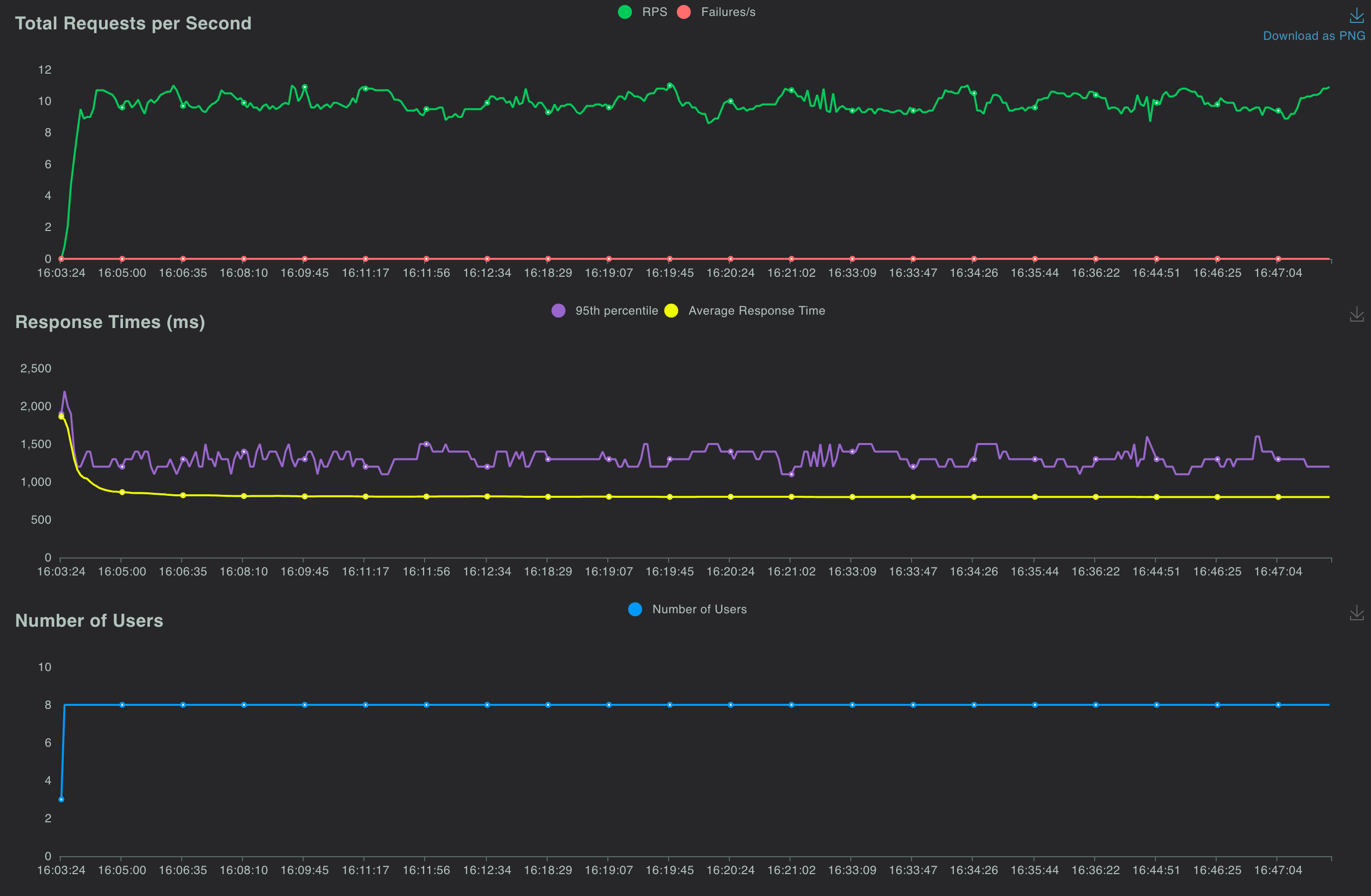
#### <mark style="color:green;">**8 concurrent users, 1000 requests per API, 1 second ramp up time per user**</mark>

The following readings were taken 30 minutes after starting the test. The readings were taken while the test was still running.

<table><thead><tr><th width="220">POD</th><th width="217">CPU Utilization</th><th>Memory Utilization</th></tr></thead><tbody><tr><td>Mapper POD</td><td>2 cpu</td><td>546 MB</td></tr><tr><td>Postgres POD</td><td>0.25 cpu</td><td>1.7 GB</td></tr></tbody></table>

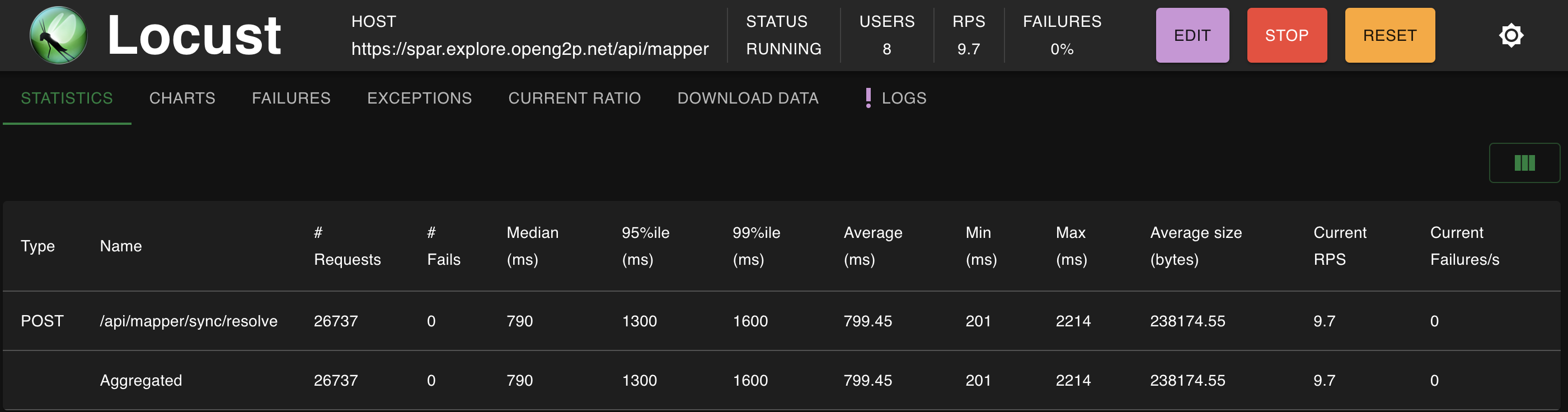
The Locust dashboard at the 30 minute showed the following readings

<figure><img src="https://1895884874-files.gitbook.io/~/files/v0/b/gitbook-x-prod.appspot.com/o/spaces%2FnKdOHLbjDdIln1QDNwSx%2Fuploads%2Fgit-blob-74ba673a006a8f6df4d7b214247ba30942e48f56%2FDuringTest-8x1000-Locust-Dashboard.png?alt=media" alt=""><figcaption><p>Locust Dashboard - 30 minutes - 8 concurrent users - 1000 records per API</p></figcaption></figure>

<figure><img src="https://1895884874-files.gitbook.io/~/files/v0/b/gitbook-x-prod.appspot.com/o/spaces%2FnKdOHLbjDdIln1QDNwSx%2Fuploads%2Fgit-blob-1fbfce8833069d68c71c35b2cdac8643c3961ab8%2FDuringTest-8x1000-Locust-Charts.png?alt=media" alt=""><figcaption><p>Locust Charts - 30 minutes - 8 concurrent users - 1000 records per API</p></figcaption></figure>

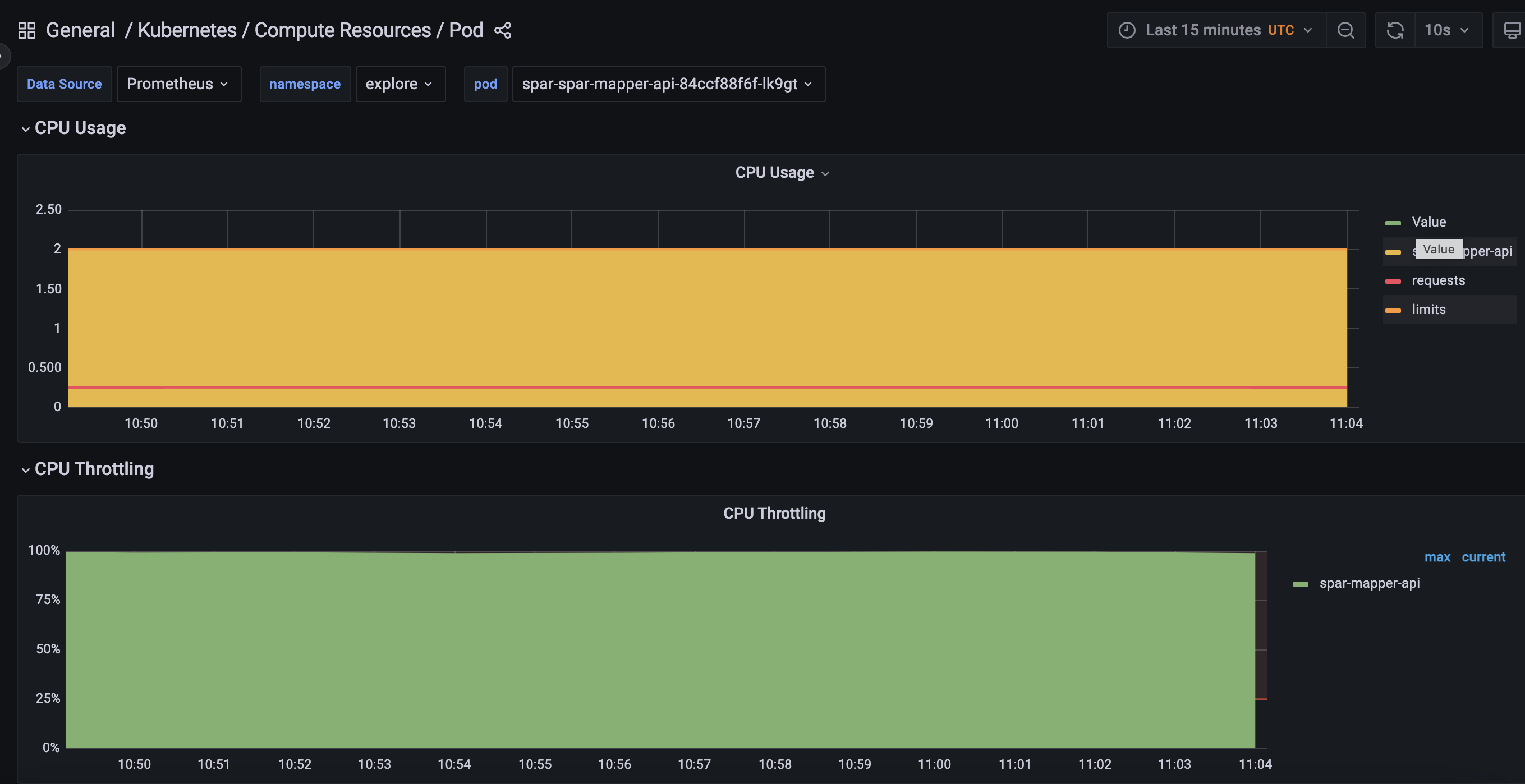
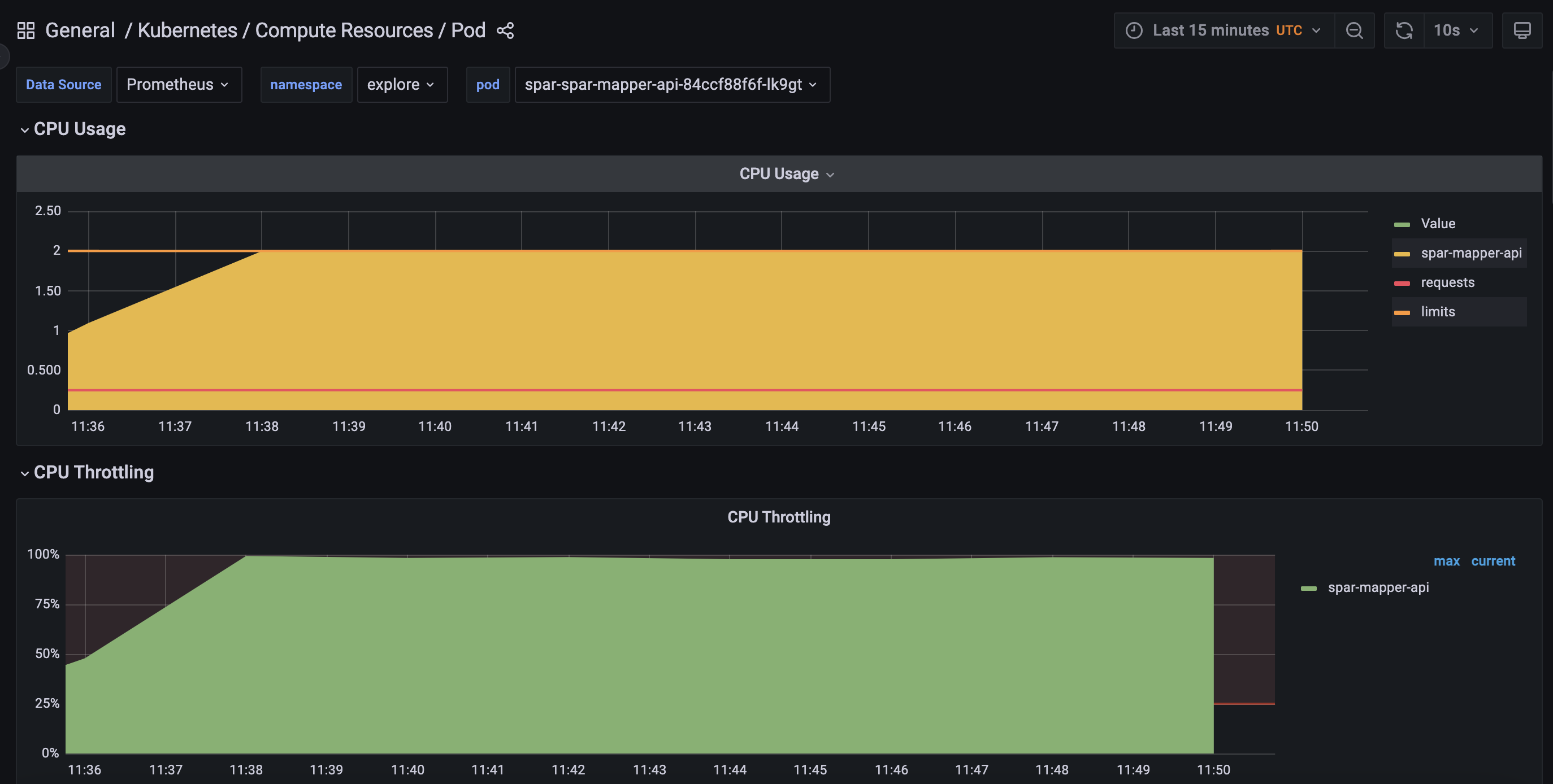
The CPU for the Mapper POD showed a 100% throttle at this stage

<figure><img src="https://1895884874-files.gitbook.io/~/files/v0/b/gitbook-x-prod.appspot.com/o/spaces%2FnKdOHLbjDdIln1QDNwSx%2Fuploads%2Fgit-blob-226618083e812d5bb9cc326e49a8f0afc7cd1190%2FDuringTest-8x1000-CPU-Throttle-MapperPOD.png?alt=media" alt=""><figcaption><p>CPU throttle - 30 minutes - 8 concurrent users - 1000 records per API</p></figcaption></figure>

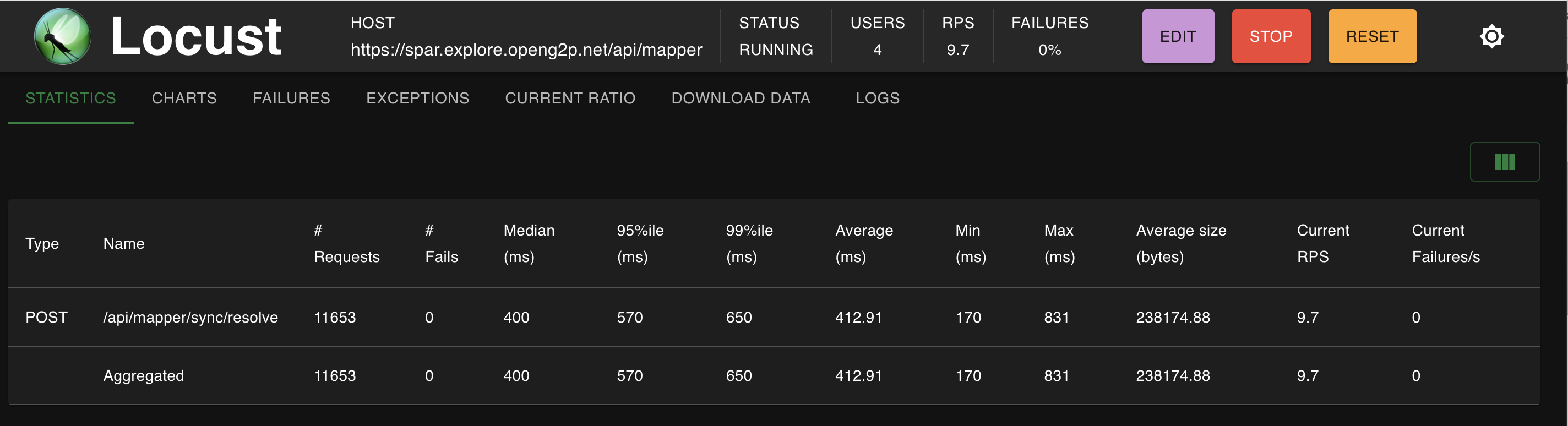
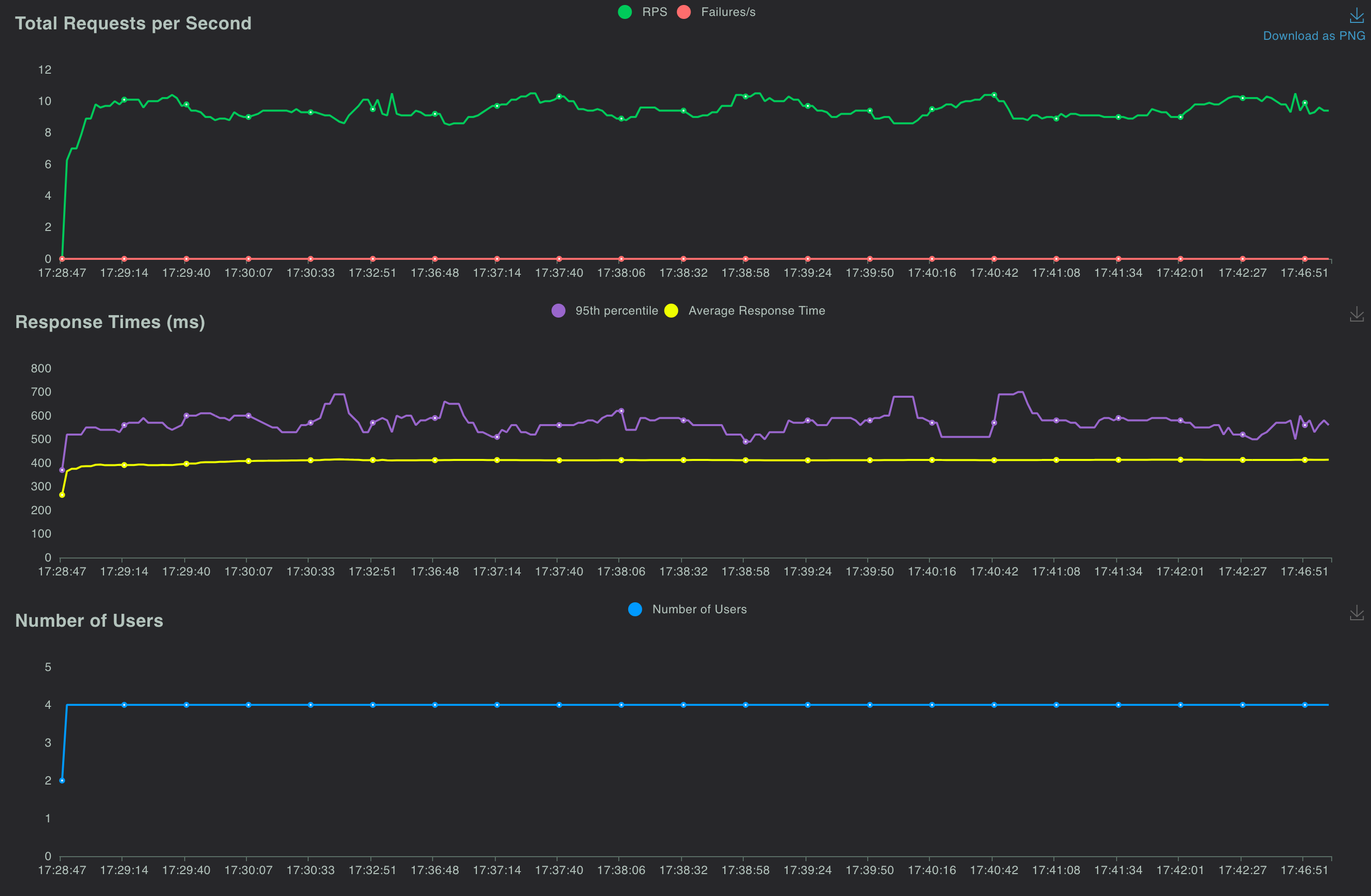
#### <mark style="color:green;">**4 concurrent users, 1000 requests per API, 1 second ramp up time per user**</mark>

The following readings were taken 30 minutes after starting the test. The readings were taken while the test was still running.

<table><thead><tr><th width="220">POD</th><th width="217">CPU Utilization</th><th>Memory Utilization</th></tr></thead><tbody><tr><td>Mapper POD</td><td>2 cpu</td><td>546 MB</td></tr><tr><td>Postgres POD</td><td>0.225 cpu</td><td>1.7 GB</td></tr></tbody></table>

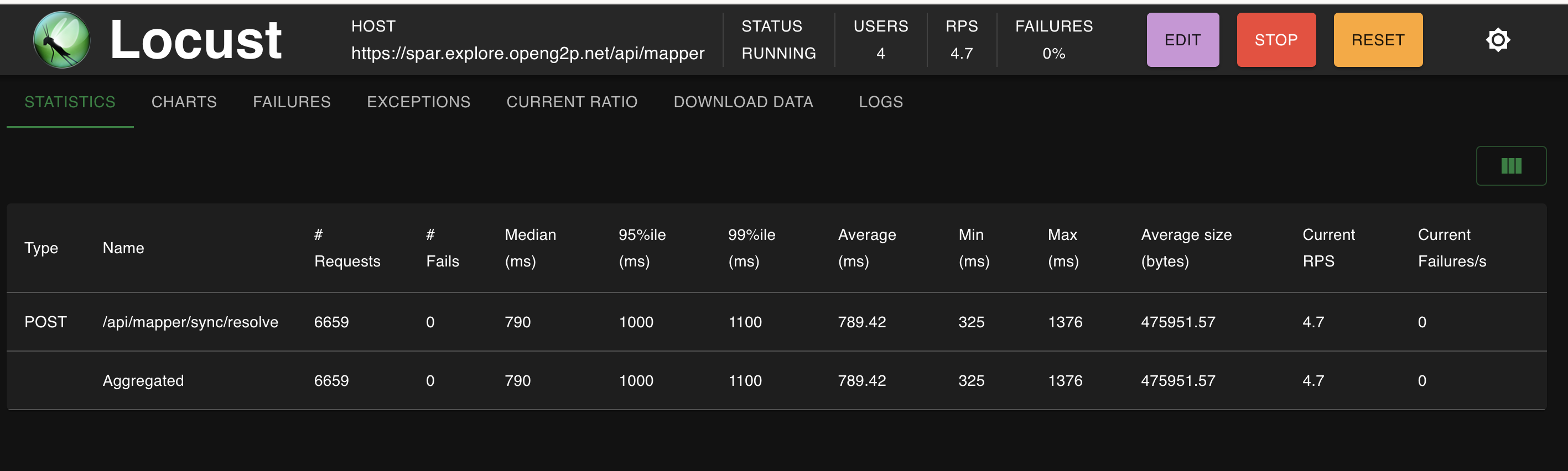
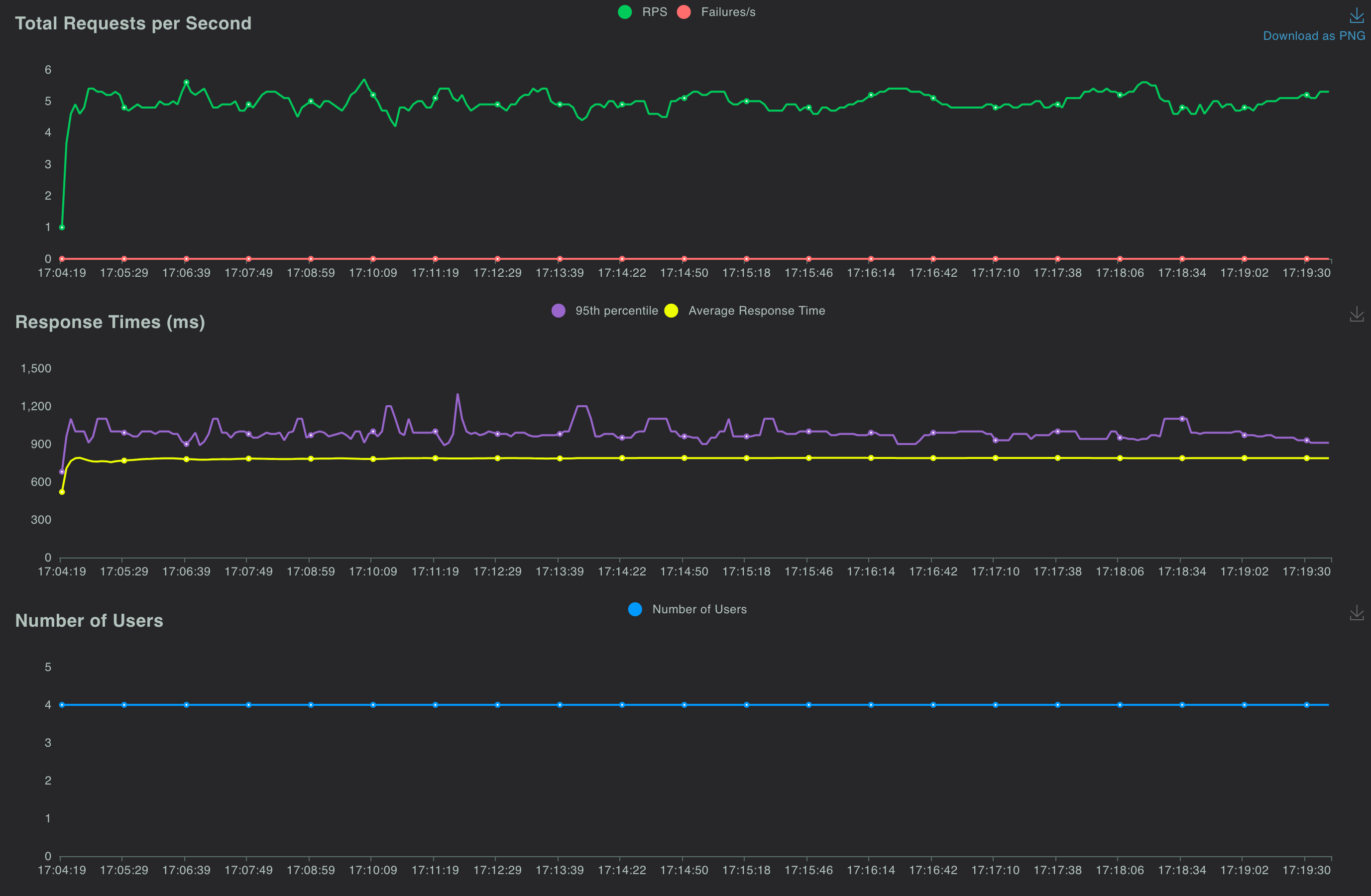
The Locust dashboard at the 30 minute showed the following readings

<figure><img src="https://1895884874-files.gitbook.io/~/files/v0/b/gitbook-x-prod.appspot.com/o/spaces%2FnKdOHLbjDdIln1QDNwSx%2Fuploads%2Fgit-blob-4da4313b9f935ae06961cb0321897a6b2b7ac791%2FDuringTest-4x1000-Locust-Stats-2.png?alt=media" alt=""><figcaption><p>Locust Dashboard - 30 minutes - 4 concurrent users - 1000 records per API</p></figcaption></figure>

<figure><img src="https://1895884874-files.gitbook.io/~/files/v0/b/gitbook-x-prod.appspot.com/o/spaces%2FnKdOHLbjDdIln1QDNwSx%2Fuploads%2Fgit-blob-b45032e1da1fd8d21de3b5841bf0dc194bc5fe82%2FDuringTest-4x1000-Locust-Charts.png?alt=media" alt=""><figcaption><p>Locust Charts - 30 minutes - 4 concurrent users - 1000 records per API</p></figcaption></figure>

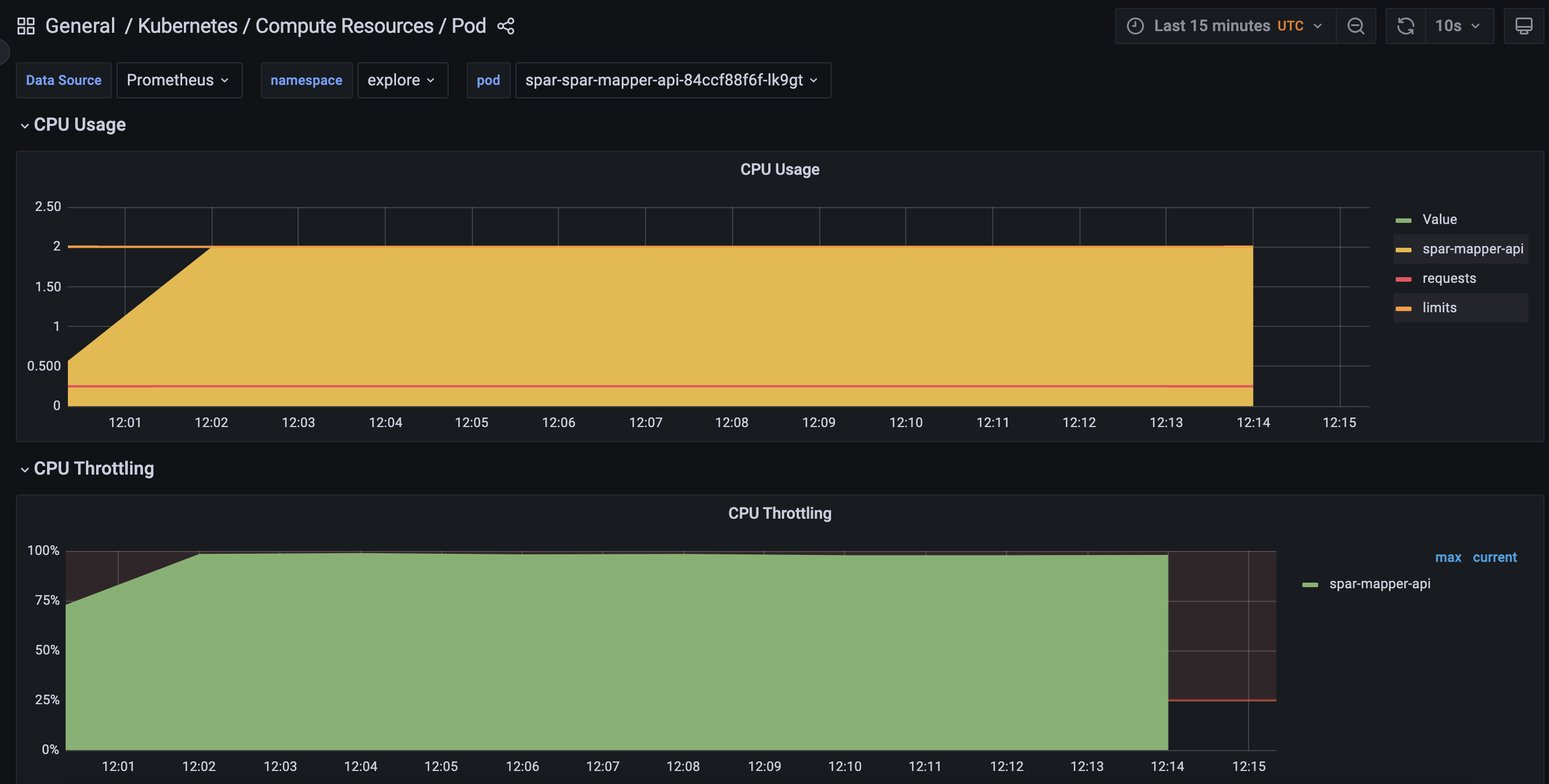
The CPU for the Mapper POD showed a 100% throttle at this stage

<figure><img src="https://1895884874-files.gitbook.io/~/files/v0/b/gitbook-x-prod.appspot.com/o/spaces%2FnKdOHLbjDdIln1QDNwSx%2Fuploads%2Fgit-blob-bb37d58eb44ec1c0891c454ded74f238e9b70784%2FDuringTest-4x1000-CPU-Throttle-MapperPOD.png?alt=media" alt=""><figcaption><p>CPU throttle - 30 minutes - 4 concurrent users - 1000 records per API</p></figcaption></figure>

#### <mark style="color:green;">**4 concurrent users, 2000 requests per API, 1 second ramp up time per user**</mark>

The following readings were taken 30 minutes after starting the test. The readings were taken while the test was still running.

<table><thead><tr><th width="220">POD</th><th width="217">CPU Utilization</th><th>Memory Utilization</th></tr></thead><tbody><tr><td>Mapper POD</td><td>2 cpu</td><td>590 MB</td></tr><tr><td>Postgres POD</td><td>0.235 cpu</td><td>1.7 GB</td></tr></tbody></table>

The Locust dashboard at the 30 minute showed the following readings

<figure><img src="https://1895884874-files.gitbook.io/~/files/v0/b/gitbook-x-prod.appspot.com/o/spaces%2FnKdOHLbjDdIln1QDNwSx%2Fuploads%2Fgit-blob-dd5146786b0bcf45958aae6e53ca7757f982b7bb%2FDuringTest-4x2000-Locust-Stats-2.png?alt=media" alt=""><figcaption><p>Locust Dashboard - 30 minutes - 4 concurrent users - 2000 records per API</p></figcaption></figure>

<figure><img src="https://1895884874-files.gitbook.io/~/files/v0/b/gitbook-x-prod.appspot.com/o/spaces%2FnKdOHLbjDdIln1QDNwSx%2Fuploads%2Fgit-blob-270154d3accb554bc9d945ce308bb98fa8de6122%2FDuringTest-4x2000-Locust-Charts.png?alt=media" alt=""><figcaption><p>Locust Charts - 30 minutes - 4 concurrent users - 2000 records per API</p></figcaption></figure>

The CPU for the Mapper POD showed a 100% throttle at this stage

<figure><img src="https://1895884874-files.gitbook.io/~/files/v0/b/gitbook-x-prod.appspot.com/o/spaces%2FnKdOHLbjDdIln1QDNwSx%2Fuploads%2Fgit-blob-8d9e9b50671b0403deac6a456e06294b0e5b57a2%2FDuringTest-4x2000-CPU-Throttle-MapperPOD.png?alt=media" alt=""><figcaption><p>CPU throttle - 30 minutes - 4 concurrent users - 2000 records per API</p></figcaption></figure>

The table below summarizes these measurements

{% embed url="<https://docs.google.com/spreadsheets/d/1OBBCjhRD7ClKqm5UPTC_5LQFzAbGIN0O3W-TMIjmZIg/edit?usp=drive_link>" %}
Resolve API - Measurements
{% endembed %}


---

# Agent Instructions: Querying This Documentation

If you need additional information that is not directly available in this page, you can query the documentation dynamically by asking a question.

Perform an HTTP GET request on the current page URL with the `ask` query parameter:

```
GET https://docs.openg2p.org/1.3/spar/development/testing/performance-testing/mapper/resolve-api.md?ask=<question>
```

The question should be specific, self-contained, and written in natural language.
The response will contain a direct answer to the question and relevant excerpts and sources from the documentation.

Use this mechanism when the answer is not explicitly present in the current page, you need clarification or additional context, or you want to retrieve related documentation sections.