# Link FA (Admin)
## Introduction
This document contains step-by-step instructions for the administrator to link IDs with Financial Address (FA) information. The administrator has to run the script to map the National IDs with the bulk FA of the beneficiaries.
## Prerequisite
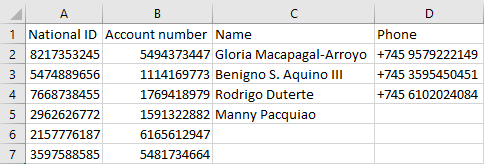
* Administrator must have a .csv file which contains the bulk FA data of the beneficiaries in the required format. To know the format of the .csv file, refer the [sample\_data.csv](https://github.com/OpenG2P/social-payments-account-registry/tree/develop/scripts) file available in the cloned repository. In .csv file, the mandatory columns are National ID and Account number. The optional columns are Name and Phone.
sample_data.csv
* The administrator system must have python and its modules cryptography, requests installed
## Procedure
The administrator must follow the following sequence process:
1. The administrator must clone the repository
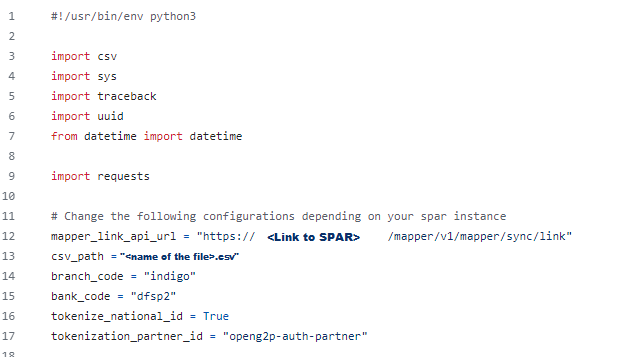
2. Click the python script file ***link\_mapper.py***. The script is displayed.
Python script
In the script, the ***mapper\_link\_api\_url*** and the ***csv\_path*** must be verified and updated.
3. Double click the script file ***link\_mapper.py*** to run the script.
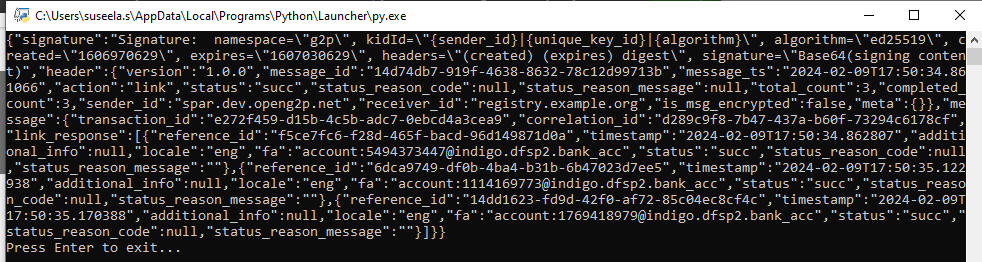
4. After the administrator runs the script, the response is triggered in a cmd prompt which shows that the National IDs are linked to the FA of the beneficiaries.
Sample response message.
5. Press Enter to exit from the cmd prompt.
***Note:***
Administrator can use a JSON formatter to format the response triggered in cmd format and to infer the response.