4. scope = openid profile
1. openid (mandatory, confirms OpenID protocol)
2. profile (requests for basic ID profile)
The registry ideally should not request for any more claims
5. state = generated random value
1. the API generates a random value and stores it in memory
2. the IdP gets this state value in the request
3. the IdP does not change this value and returns this unchanged value back in the registry callback
4. the registry will validate this value on receiving the callback from IdP, during **Step-8**
5. this mechanism is to mitigate CSRF attacks
6. code\_challenge
1. the API generates a random value (called code\_verifier) and stores it in memory
2. code\_challenge = BASE64(SHA256(code\_verifier)
3. the IdP will use this code\_challenge in **Step-9** to validate whether the requester is the original owner of the transaction
4. This mechanism, called PKCE (Proof Key for Code Exchange), ensures that an authorization code can be redeemed only by the component that initiated the authorization transaction. Even if an authorization code is intercepted, it is unusable without the corresponding proof key (`code_verifier`). PKCE provides a dynamic, per-transaction proof of possession of the authorisation transaction.
7. code\_challenge\_method
1. S256 - This says the code\_challenge has been created using the SHA-256 algorithm
2. The IDP will use this algorithm to compute the Hash Value of the Code Verifier in **Step-9**
8. nonce
1. This is a random String (high entropy, high randomness) generated by this API
2. The API will store this NONCE
3. In Step-8, when the Registry receives the token (registry exchanges the authorization\_code for tokens), the registry will unpack the NONCE and validate this NONCE value
4. This NONCE validation, ensures that a TOKEN is bound to the original STATE (mentioned in Point 5)
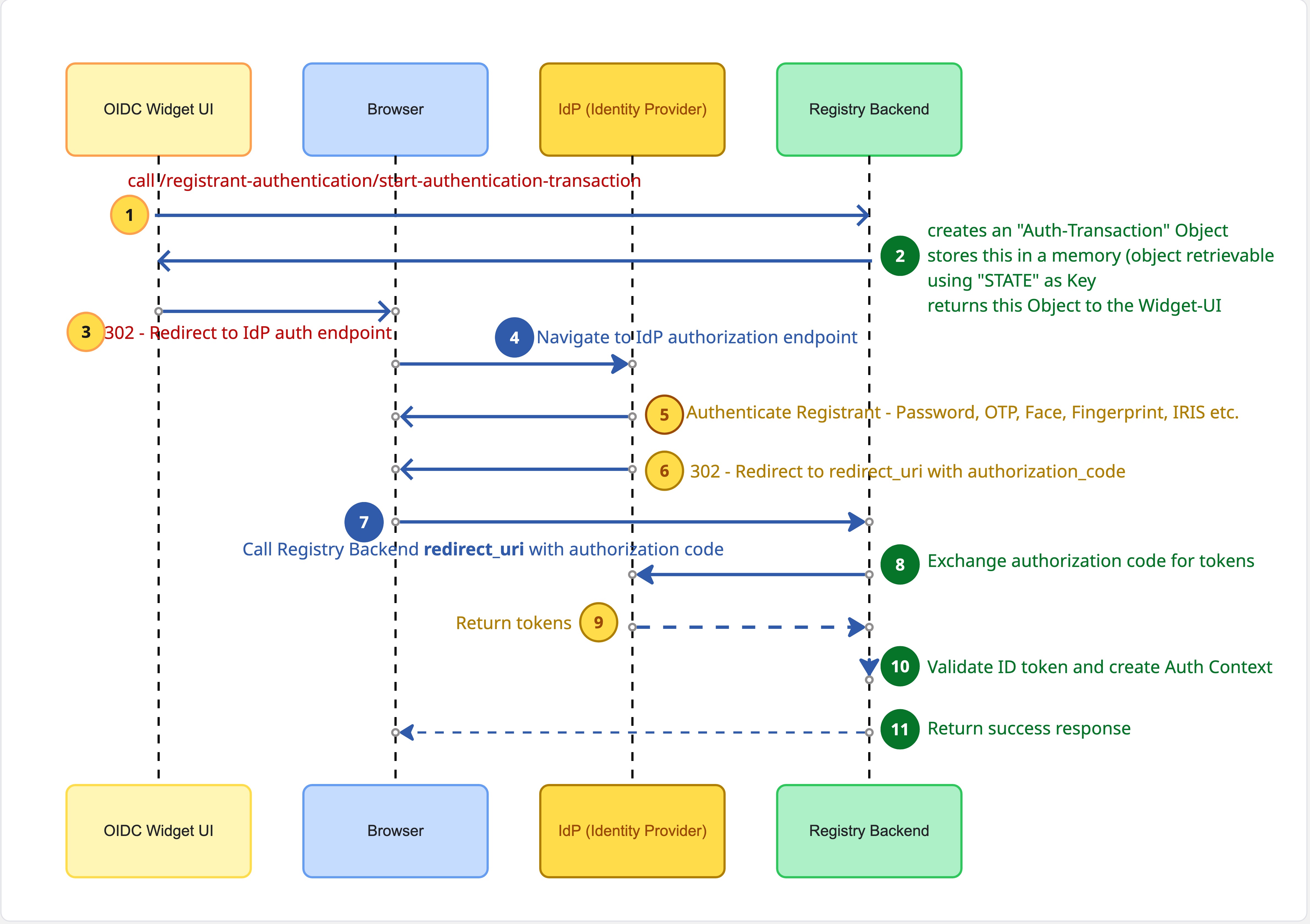
9. To support this functionality, the API - **start\_authentication\_transaction** will store the following **Auth\_Transaction** object in REDIS. This object will be addressed (retrievable) by using the **STATE** value as Key**.**
AuthTransaction {
state: "af0ifjsldkj", ## key value for retrieving the object
codeVerifier: "dBjftJeZ4CVP-mB92K27uhbUJU1p1r_wW1gFWFOEjXk", ## IdP uses, to validate ownership of Authorization Code
nonce: "random-opaque-value", ## Registry uses to prevent replay of Tokens
clientId: "FARMER_REGISTRY_DOA_SOME_PROVINCE",
redirectUri: "https://farmer_registry.doasp.org/registrant_authentication/callback",
createdAt: "2026-03-03T06:20:00Z",
expiresAt: "2026-03-03T06:25:00Z",
registrantId: "124a-2utz-1ute-1jdt"
}
**Step-3 (302 Redirect from OIDC Widget to IdP Authorization Endpoint)**
GET https://idp.example.org/authorize
?response_type=code
&client_id=FARMER_REGISTRY_DOA_SOME_PROVINCE
&redirect_uri=https://farmer_registry.doasp.org/registrant_authentication/callback
&scope=openid profile
&state=af0ifjsldkj
&code_challenge=E9Melhoa2OwvFrEMTJguCHaoeK1t8URWbuGJSstw-cM
&code_challenge_method=S256
&nonce=n-0S6_WzA2Mj
**Step - 4 (Navigate to IdP Authorization endpoint)**
This is handled by the Browser Engine
**Step - 5 (Authenticate Registrant)**
This is handled by the IdP depending on how the ID Authentication mechanism has been configured.
**Step - 6 (Redirect to redirect\_uri)**
This is handled by the IdP, once it establishes the result of Authentication
**Step - 7 (Handle the redirect into redirect\_uri)**
This is handled by the Browser Engine
**Step - 8 (Exchange the Authorization\_Code for Tokens)**
This API is implemented by the Registry. This is the API that is specified in the original request as "redirect\_uri" —
In this API, the Registry will receive the "Authorization\_Code" and the "State" as URL parameters
```
https://registry.example.org/oidc/callback
?code=SplxlOBeZQQYbYS6WxSbIA
&state=af0ifjsldkj
```
1. Retrieve the Auth\_Transaction using the state
2. Validate existence of State
3. Validate expiry time of the Transaction
4. Use Code\_Verifier and call the IdP to exchange the Authorization\_Code for Token
5. This is a POST request (Server to Server)
**Endpoint**
```
https://idp.example.org/oauth2/token
```
**HTTP Request**
```
POST /oauth2/token HTTP/1.1
Host: idp.example.org
Content-Type: application/x-www-form-urlencoded
Authorization: Basic cmVnaXN0cnktY2xpZW50OnMzY3IzdA==
```
**HTTP Request Body**
```
grant_type=authorization_code
&code=SplxlOBeZQQYbYS6WxSbIA
&redirect_uri=https://farmer_registry.doasp.org/registrant_authentication/callback
&client_id=FARMER_REGISTRY_DOA_SOME_PROVINCE
&code_verifier=dBjftJeZ4CVP-mB92K27uhbUJU1p1r_wW1gFWFOEjXk
```
**Step - 9 (Return the Tokens)**
The IdP validates the code\_verifier (using SHA-256) and returns the Tokens.
**Step - 10 (Validate ID Token and create "Identity-Verification" Context)**
1. Validate the Signature of the Token
2. The Public Keys of the IdP are available at
```
https://idp.example.org/.well-known/jwks.json
```
* Read `kid` from ID token header
* Select matching key from JWKS
* Verify the signature using the declared algorithm (`alg`)
3. Validate the following claims
| Claim | Validation |
| ------- | ------------------------------------------------------------------------------- |
| `iss` | Must match IdP issuer |
| `aud` | Must contain registry client\_id - FARMER\_REGISTRY\_DOA\_SOME\_PROVINCE |
| `exp` | Must be in the future |
| `iat` | Must be reasonable |
| `nbf` | (If present) must be ≤ now |
| `nonce` | Must match stored nonce (auth\_transaction.nonce) |
| `sub` | Must be present and the value should match the auth\_transaction.registrant\_id |
4. Create an "Identity-Verification" context
```
{"identity-verificationId": "VER-2026-00123",
"registrantId": "REG-12345",
"idp": "idp.example.org",
"subject": "00u123abcXYZ",
"verifiedAt": "2026-03-03T08:10:00Z",
"validUntil": "2027-03-03T08:10:00Z",
"assuranceLevel": "strong",
"verificationMethod": "oidc",
"claimsVerified": { "name": true, "date_of_birth": true, "phone": true }
}
```
5. The Register-Record should have a status = "Identity-verified" - BOOLEAN - that should be marked TRUE along with the latest "identity-verificationId"
6. The Identity-Verification Context should be persisted in another table - which has Identity-VerificationId as the Primary Key
**Step - 11 (Return Success Response to Browser)**
---
# Agent Instructions
This documentation is published with GitBook. GitBook is the documentation platform designed so that both humans and AI agents can read, navigate, and reason over technical content effectively. Learn more at gitbook.com.
## Querying This Documentation
If you need additional information that is not directly available in this page, you can query the documentation by asking a question.
Perform an HTTP GET request on the following URL with the `ask` and `goal` query parameters:
```
GET https://docs.openg2p.org/products/registry/registry/design/registrant-authentication-oidc-widget.md?ask=&goal=
```
`ask` is the immediate question: it should be specific, self-contained, and written in natural language.
`goal` is what the user is ultimately trying to achieve, the reason they need the answer. Sharing it helps GitBook give you a better, more relevant answer. A goal is most helpful when it describes the outcome the user wants rather than restating the question. For example, with `ask=how do I create an API token`, a goal like `automate deployments from our CI pipeline` lets GitBook tailor the answer to that use case.
The response will contain a direct answer to the question and relevant excerpts and sources from the documentation.
Use this mechanism when the answer is not explicitly present in the current page, you need clarification or additional context, or you want to retrieve related documentation sections.