> For the complete documentation index, see [llms.txt](https://docs.openg2p.org/llms.txt). Markdown versions of documentation pages are available by appending `.md` to page URLs; this page is available as [Markdown](https://docs.openg2p.org/products/registry/disability-registry.md).
# Disability Registry
A registry of persons with disability — who they are, what support they need, and how much of it they are actually getting.
{% hint style="info" %}
**Source:** [github.com/OpenG2P/disability-registry](https://github.com/OpenG2P/disability-registry)
{% endhint %}
An estimated **1.3 billion people — about 16% of the world's population — live with a significant disability** ([WHO](https://www.who.int/news-room/fact-sheets/detail/disability-and-health)), and they are consistently poorer, less likely to be in work and less likely to be enrolled in the programmes meant for them. A disability registry is the instrument a government uses to close that gap: an authoritative record of who has a disability, what kind and how severe, what support they need, and what they already receive — so that entitlements can be granted, assistive products procured, and coverage measured. The obligation to collect exactly this data is set out in [UNCRPD Article 31](https://www.ohchr.org/en/instruments-mechanisms/instruments/convention-rights-persons-disabilities), and the operational case is made in the [WHO Global report on health equity for persons with disabilities](https://www.who.int/publications/i/item/9789240063600). For a resident, the registry is what turns a diagnosis into an entitlement without having to prove it again at every counter — one assessment, recognised across programmes, with the certificate, the assistive-product request and the allowance all hanging off the same record.
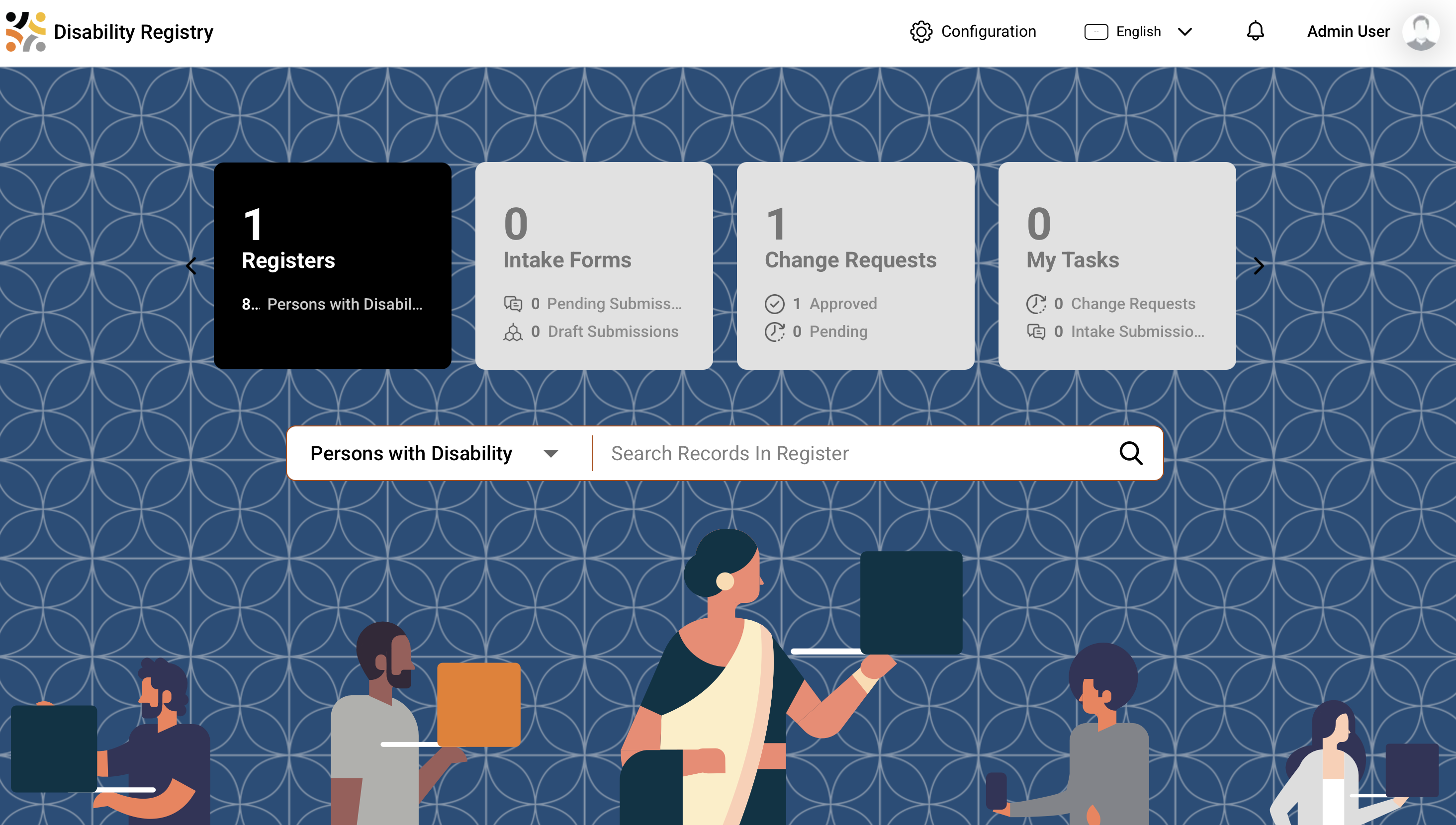
The staff portal: one person, their assessed status, impairments, and the support they need or receive
**OpenG2P Disability Registry** is a manifestation of the [OpenG2P Registry Platform](/products/registry/registry.md) with specifics related to disability registration and disability-inclusive social protection.
```mermaid
graph LR
A["OpenG2P Registry Platform"] --- P((" + ")) --- B["Disability Extensions"] --- E((" = ")) --- C["Disability Registry"]
style A fill:#e8f4fd,stroke:#2196F3,color:#000
style B fill:#fff3e0,stroke:#FF9800,color:#000
style C fill:#e8f5e9,stroke:#4CAF50,stroke-width:2px,color:#000
style P fill:#fff,stroke:#999,font-size:24px,color:#000
style E fill:#fff,stroke:#999,font-size:24px,color:#000
```
## What makes this registry distinct
Six things characterise this manifestation. The rest of the page expands on each.
| | |
| ------------------------------------ | ------------------------------------------------------------------------------------------------------------------------------------------------------------------------------------------------------------------------ |
| **One register: the person** | The subject is the individual with a disability. There is no household or group register — see [A registry about people, not households](#a-registry-about-people-not-households) |
| **It tracks the support gap** | Every support record says whether it is *needed* or *received*. The difference is the number the registry exists to produce — see [Need versus provision](#need-versus-provision) |
| **Standards-aligned** | Built to the SPDCI Disability Registry data objects, so records are shareable without translation — see [Standards alignment](#standards-alignment) |
| **Works in any country** | No country, administrative level or national programme is named anywhere in it — see [Works in any country](#works-in-any-country) |
| **Access needs are structured data** | Communication needs, contact preferences and legal capacity are recorded so departments can serve people accessibly — see [Who uses it, and what it records about access](#who-uses-it-and-what-it-records-about-access) |
| **Everything the platform gives** | Approval workflows, consent-aware data sharing, audit, RBAC, deduplication, version history, dynamic UI — see [platform features](/products/registry/registry/features.md) |
## Need versus provision
The registry's central purpose is to make one number visible: **how many people need support they are not getting**, and where they are.
Every support record — a wheelchair, a caregiver, a home adaptation, regular medication — carries a status saying whether the person *needs* it or is *receiving* it. The gap between the two is unmet need, and everything is built around measuring it:
* each person carries a running count of their unmet needs, so "how many people have an unmet need" is answered instantly rather than assembled from five separate tables;
* the triage score weights that count most heavily — an unmet need is an observed service gap, whereas severity is a clinical judgement that says nothing about whether the person is already supported;
* the reporting layer combines all five kinds of support into a single view, so every chart uses **one** definition of "unmet" rather than five slightly different ones.
The headline measure that falls out of this is *"people with an unmet need who are enrolled in no programme"* — a work list an administrator can act on, rather than a coverage percentage.
{% hint style="warning" %}
The support-need score is a **triage aid** — it orders a caseload so the most support-dependent people are reached first. It is deliberately **not** an eligibility rule. In a rights-based system entitlement follows from assessment and law; a score used as a gate quietly becomes one.
{% endhint %}
## A registry about people, not households
One [register](/products/registry/registry/concepts.md#register) — `PersonWithDisability` — with eight supporting tables and **no group register**.
That is a deliberate fit to the domain, not a simplification. The relationships that matter in a disability case — a guardian, a primary caregiver, an emergency contact — are frequently **not** people the registrant lives with, so a household roster would miss exactly the ones who matter. They are recorded as *related persons* instead, each flagged for the role they actually play.
| Register | Purpose | Holds |
| -------------------------- | ------------ | ------------------------------------------------------------------------------------------------------------------------------------------------ |
| **Person with Disability** | `REGISTER` | Identity, assessed status and level, certificate and re-assessment dates, living situation, transport needs, legal capacity, communication needs |
| Disability Details | `TABLE` | One row per impairment — type, level, cause, age of onset |
| Human Assistance | `TABLE` | Care and personal assistance, with caregiver details and hours |
| Assistive Technology | `TABLE` | Assistive products, from the WHO Priority Assistive Products List |
| Medical Care | `TABLE` | Chronic care and its out-of-pocket cost |
| Housing Support | `TABLE` | Adaptations, relocation, supported accommodation |
| Animal Assistance | `TABLE` | Assistance animals and their certification |
| Related Persons | `TABLE` | Family, guardians, caregivers, emergency contacts |
| Programme Enrolments | `TABLE` | Other programmes the person already benefits from |
| Scores | `CORE_TABLE` | The computed support-need triage score |
Because a person may have several impairments and several kinds of support at once, each of those is a **list** rather than a field — co-occurring impairments are the norm, and collapsing them to a single "primary" loses the combination that actually determines what someone needs.
It is therefore also the worked example to follow if **your** domain has a single subject — see [Building a Registry](/products/registry/registry/developer-zone/building-a-registry.md).
## Standards alignment
The domain is modelled on the [SPDCI Disability Registry data objects](https://standards.spdci.org/standards/dci-standards/wip-disability-registry) (DO.DR.01 – DO.DR.10), so a record shared over DCI already arrives in the shape a social protection system expects.
| SPDCI object | Here |
| ------------------------------- | ------------------------------------------------------------------- |
| DO.DR.01 `DRPerson` | the person's identity fields (`demographic_info` in the DCI record) |
| DO.DR.02 `Member` | socio-economic attributes and `related_person` |
| DO.DR.03 `PersonwithDisability` | the master register |
| DO.DR.04 `DisabilityDetails` | Disability Details |
| DO.DR.05 `DisabilitySupport` | a **container**, not an entity — it groups DO.DR.06–10 |
| DO.DR.06 – DO.DR.10 | the five support tables |
{% hint style="info" %}
DO.DR.05 is the one object with no table behind it. In the standard it is a grouping of the five support objects, so it is modelled as exactly that — and reassembled into a single `disability_support` block when a record is shared.
{% endhint %}
Vocabularies are international rather than national: the [Washington Group](https://www.washingtongroup-disability.com/) functional-difficulty scale for impairment level, the [WHO Priority Assistive Products List](https://www.who.int/publications/i/item/priority-assistive-products-list) for assistive technology, and ICF-based impairment groupings. A registry seeded from census or household-survey data therefore needs no re-coding.
## Works in any country
Nothing in the registry names a country, an administrative level, or a national programme:
* **geography** comes from whatever country pack the environment's Master Data Service holds, and reports address administrative levels by depth rather than by name — so the same chart works for a country with regions and districts and one with provinces and communes;
* **code lists** ship as defaults drawn from the international vocabularies above, and a country pack replaces any list it also defines;
* **programme names** are a configurable list, not fixed values in code.
One image therefore serves any country. See [Customisation](/products/registry/disability-registry/customisation.md) for how to point it at yours.
## Who uses it, and what it records about access
The registry is an **administrative system**. Its users are staff of the government departments that operate it — registration officers, assessment boards, caseworkers, programme administrators — plus, through the partner API, other systems that are entitled to query it. People with disabilities are the **subjects** of the records, not users of the software.
That distinction matters for how the data is designed. A department cannot serve someone accessibly unless the record tells it how, so the registry captures access requirements as **structured data** that downstream services and outreach can act on:
* **Communication needs.** Sign language, braille, easy-read, captioning, tactile signing, "interpreter required" — held as a multi-valued field, because these co-occur. A deafblind person may need both tactile signing and large print, and a single-choice field would force a wrong answer. An office scheduling an assessment can see that an interpreter must be booked.
* **How to make contact.** Preferred contact method includes sign-language video call and contact via a caregiver — so a department's outreach can honour it rather than defaulting to SMS.
* **Legal capacity.** Whether a person makes their own decisions, is supported in making them, or has a guardian, recorded following [UNCRPD Article 12](https://www.ohchr.org/en/instruments-mechanisms/instruments/convention-rights-persons-disabilities) — with at most one legal guardian and one primary caregiver enforced, so a caseworker is never left with an unresolved question about who may act.
None of this is decoration: it is the difference between a department knowing a person needs an interpreter and finding out when they fail to attend.
## In this section
| | |
| ---------------------------------------------------------------------------------------- | ------------------------------------------------------------------------------------------------ |
| [**Customisation**](/products/registry/disability-registry/customisation.md) | Adapting the registry to your country or use case — what is configuration, what is a code change |
| [**Dashboards and maps**](/products/registry/disability-registry/dashboards.md) | The seven Superset dashboards and the Insights map surface |
| [**Deployment**](/products/registry/disability-registry/deployment.md) | How it is packaged, where the source and artifacts live, and what each image contains |
| [**Deploying on Rancher**](/products/registry/disability-registry/deployment/rancher.md) | Step-by-step install |
| [**Versions**](/products/registry/disability-registry/versions.md) | Where releases and changelogs are published |
---
# Agent Instructions
This documentation is published with GitBook. GitBook is the documentation platform designed so that both humans and AI agents can read, navigate, and reason over technical content effectively. Learn more at gitbook.com.
## Querying This Documentation
If you need additional information that is not directly available in this page, you can query the documentation by asking a question.
Perform an HTTP GET request on the following URL with the `ask` and `goal` query parameters:
```
GET https://docs.openg2p.org/products/registry/disability-registry.md?ask=&goal=
```
`ask` is the immediate question: it should be specific, self-contained, and written in natural language.
`goal` is what the user is ultimately trying to achieve, the reason they need the answer. Sharing it helps GitBook give you a better, more relevant answer. A goal is most helpful when it describes the outcome the user wants rather than restating the question. For example, with `ask=how do I create an API token`, a goal like `automate deployments from our CI pipeline` lets GitBook tailor the answer to that use case.
The response will contain a direct answer to the question and relevant excerpts and sources from the documentation.
Use this mechanism when the answer is not explicitly present in the current page, you need clarification or additional context, or you want to retrieve related documentation sections.