> For the complete documentation index, see [llms.txt](https://docs.openg2p.org/llms.txt). Markdown versions of documentation pages are available by appending `.md` to page URLs; this page is available as [Markdown](https://docs.openg2p.org/products/open-agri-stack/architecture/consent.md).
# Consent
Consent in Agri Stack: one consent per partner and farmer with a grant per registry, collected and kept by the Exchange's Consent Manager, and a consent token per registry at query time. How a farmer
A partner (e.g. a bank) needs the farmer's consent before Agri Stack shares the farmer's data with it. In Agri Stack:
* **One consent covers every registry the partner needs.** The bank asks once, for the data its use case needs; inside, the consent holds a **grant per registry** (Farmer Registry, Crop Sown Registry, …). The bank never deals with which registry holds what.
* **The Exchange's Consent Manager (CM) collects and keeps it,** not the bank. The farmer confirms it there and proves who they are with the national ID.
* **Each registry decides for itself.** At query time the Exchange CM gives the Composite a short-lived **consent token** per registry, with only that registry's allowed scopes, and each registry checks its token at its **own** CM against the department's ceiling for the Composite ([request flow](/products/open-agri-stack/architecture/request-flow.md)). Why a token, rather than passing the consent on or simply trusting the Composite up to the ceiling: [why a consent token](/platform/platform-services/consent-management/design/exchange-receipts.md#why-a-consent-token).
{% hint style="info" %}
**Consent object, artefact, receipt, token** are four different things; see [key terms](/platform/platform-services/consent-management/design.md#key-terms). The reasons behind this model (one consent with a grant per registry, each registry validating its own grant, consent tokens across installs) are the Consent Manager's [design decisions](/platform/platform-services/consent-management/design.md#design-decisions).
{% endhint %}
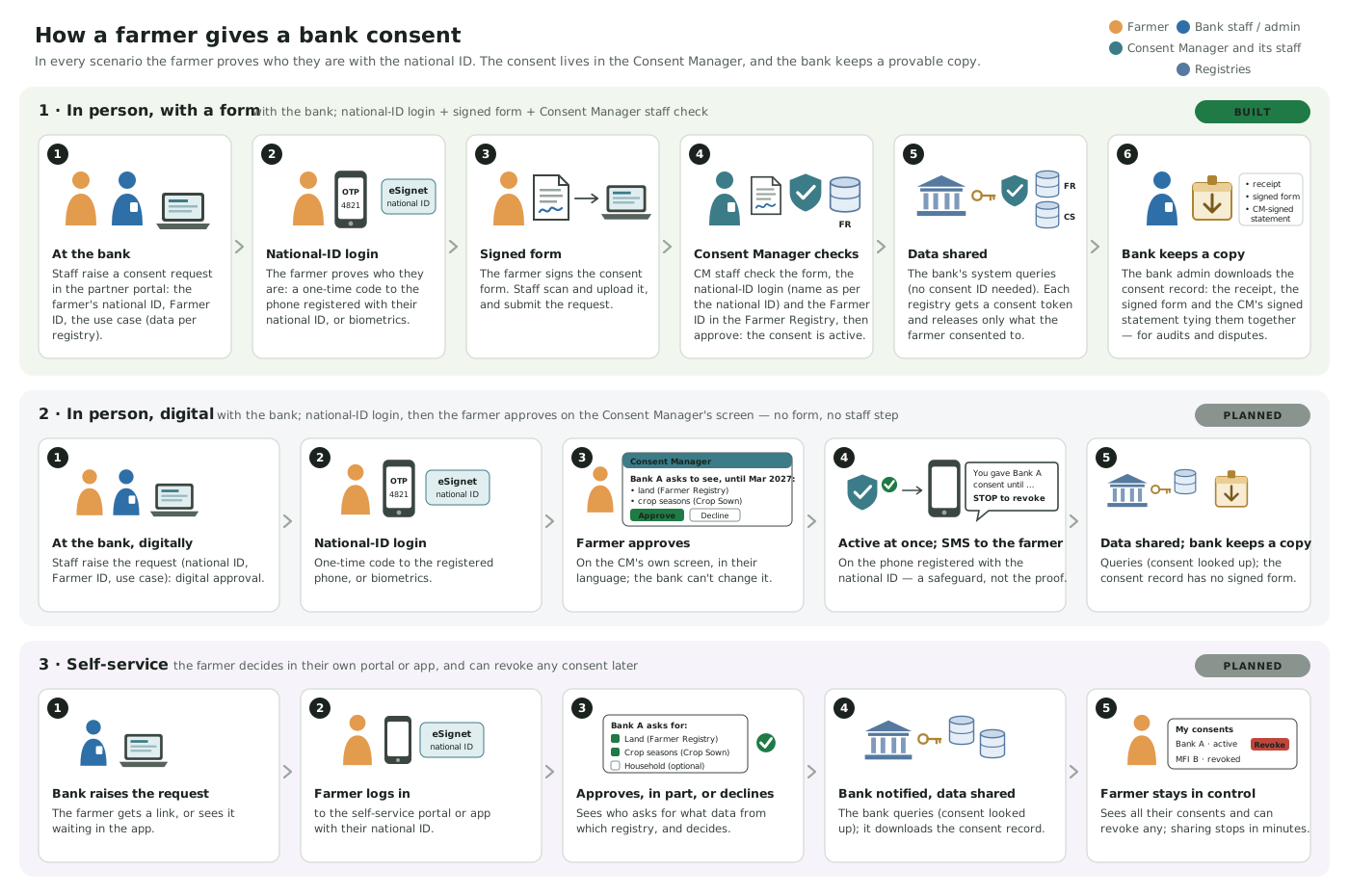
## How a farmer gives consent
The three consent scenarios
| Scenario | Status | How the farmer confirms |
| ------------------------------ | --------- | ----------------------------------------------------------------------------------------------------------------------------------------------------------------------- |
| **1 · In person, with a form** | **Built** | National-ID login (eSignet) on the bank's device, a signed form, and a check by CM staff |
| **2 · In person, digital** | Planned | National-ID login, then the farmer approves the request on the CM's own screen; active at once, no form, no staff step; an SMS to the registered phone lets them revoke |
| **3 · Self-service** | Planned | National-ID login in their own portal or app, where they approve or decline, and can revoke any consent |
In every scenario the farmer proves who they are with the national ID; an SMS is only ever a notification afterwards. The steps, the partner portal and the gaps are in the Consent Manager's [consent collection](/platform/platform-services/consent-management/design/consent-collection.md).
## What is specific to Agri Stack
* **The farmer is identified by the national ID and the Farmer ID.** The consent's subject is the national ID (`FAYDA_FAN` in the reference setup), which the farmer logs in with. Every request must also carry the **Farmer ID** (`requiredSubjectIdentifiers: [FARMER_ID]`, the Exchange role's default). CM staff check it in the **Farmer Registry**, the source of truth for the link between the two, before approving. Demographics shown to them are those of the national-ID login, labelled as such, and never compared automatically ([identifiers and demographics](/platform/platform-services/consent-management/design/consent-collection.md#identifiers-and-demographics)).
* **The data asked for comes from a use case.** In the Exchange's partner portal a request is made for one of the use cases the partner is granted (e.g. `loan-profile@1`): the use case's purpose and its scopes per registry (required and optional), read from the Composite, are the consent's purpose and grants. The consent can then be used only for that use case ([data-sharing policies](/products/open-agri-stack/architecture/data-sharing-policies.md#two-policies-two-places)).
* **The registries are the data controllers.** Each grant names a registry (`farmer-registry`, `crop-sown-registry`) and that registry's data scopes (`.`, e.g. `farmer-registry.personal_details`).
* **One consent, every registry.** The bank queries the Composite with **no consent** (the Exchange CM looks up the bank's active consent for this farmer and use case; recommended for consents collected in the partner portal), with the consent's ID (`message.consent_id`), or, if its use-case policy allows partner-signed consents, with a consent it signed itself (`message.consent_jws`, a `grants` claim with one grant per registry). Either way the Exchange CM turns it into a consent token per registry, limited to **the use case's scopes ∩ consent**, provided the bank's use-case policy in Partner Management grants that use case ([data-sharing policies](/products/open-agri-stack/architecture/data-sharing-policies.md)).
* **Usage per registry.** One-shot and periodic limits are counted per consent and registry.
* **The bank keeps a provable copy.** The consent record it downloads (receipt, signed form, the CM's signed statement) is the same in every scenario ([the partner's copy](/platform/platform-services/consent-management/design/consent-collection.md#the-partners-copy-of-a-consent)).
* **Revocation** is of the whole consent; the Exchange CM issues no further consent token for it. Registries check tokens offline, so a token already issued stays usable until it expires (5 minutes by default).
{% hint style="warning" %}
**Not built yet:** scenarios 2 and 3; declining individual items or revoking one registry's grant only; using a consent held by the **Exchange** CM directly at a registry, without the Composite (a registry looks consents up only in its own CM; [open items](/products/open-agri-stack/open-items.md)).
{% endhint %}
## Details
| Topic | Page |
| ------------------------------------------------------------------- | ---------------------------------------------------------------------------------------------------------------------------------------------------------------------------- |
| The scenarios step by step, the partner portal, the gaps | [Consent collection](/platform/platform-services/consent-management/design/consent-collection.md) |
| The national-ID login (eSignet) | [National ID authentication](/platform/platform-services/consent-management/design/consent-collection.md#national-id-authentication-in-the-partner-portal) |
| Grants, `/validate`, replay per consent and registry | [Verification & enforcement](/platform/platform-services/consent-management/design/verification-and-enforcement.md) |
| Consent tokens between the Exchange and the departments | [Exchange consent tokens](/platform/platform-services/consent-management/design/exchange-receipts.md) |
| A partner signing its own consent (`grants` claim) | [Partner Integration Guide](/platform/platform-services/consent-management/partner-integration-guide.md) and the [partner guide](/products/open-agri-stack/partner-guide.md) |
| Turning on the partner portal, the login and the required Farmer ID | [Deployment: Exchange](/platform/platform-services/consent-management/deployment.md#partner-portal-and-consent-evidence-optional) |
| Trying it end to end | [Testing](/products/open-agri-stack/deployment/testing.md#consent-through-the-partner-portal) |
---
# Agent Instructions
This documentation is published with GitBook. GitBook is the documentation platform designed so that both humans and AI agents can read, navigate, and reason over technical content effectively. Learn more at gitbook.com.
## Querying This Documentation
If you need additional information that is not directly available in this page, you can query the documentation by asking a question.
Perform an HTTP GET request on the following URL with the `ask` and `goal` query parameters:
```
GET https://docs.openg2p.org/products/open-agri-stack/architecture/consent.md?ask=&goal=
```
`ask` is the immediate question: it should be specific, self-contained, and written in natural language.
`goal` is what the user is ultimately trying to achieve, the reason they need the answer. Sharing it helps GitBook give you a better, more relevant answer. A goal is most helpful when it describes the outcome the user wants rather than restating the question. For example, with `ask=how do I create an API token`, a goal like `automate deployments from our CI pipeline` lets GitBook tailor the answer to that use case.
The response will contain a direct answer to the question and relevant excerpts and sources from the documentation.
Use this mechanism when the answer is not explicitly present in the current page, you need clarification or additional context, or you want to retrieve related documentation sections.