> For the complete documentation index, see [llms.txt](https://docs.openg2p.org/llms.txt). Markdown versions of documentation pages are available by appending `.md` to page URLs; this page is available as [Markdown](https://docs.openg2p.org/platform/platform-services/consent-management/design/consent-collection.md).
# Consent collection
How a partner seeks a subject's consent and how the subject gives it: the scenarios (in person with a form is built), national-ID login, identifiers and demographics, the partner's copy of a consent,
A partner (e.g. a bank) needs a subject's (e.g. a farmer's) consent before it can receive the subject's data from registries. **Seeking** (the partner asks) and **giving** (the subject agrees) both go through the Consent Manager (CM), so that the consent is evidence the CM holds, not a claim the partner makes.
{% hint style="info" %}
**Roles, as everywhere in OpenG2P:** *staff* (government users), *agents* (government field users), *partners* (organisations such as banks, onboarded in Partner Management), *beneficiaries* (subjects, e.g. farmers). A partner's own employees using the partner portal are **partner users**.
{% endhint %}
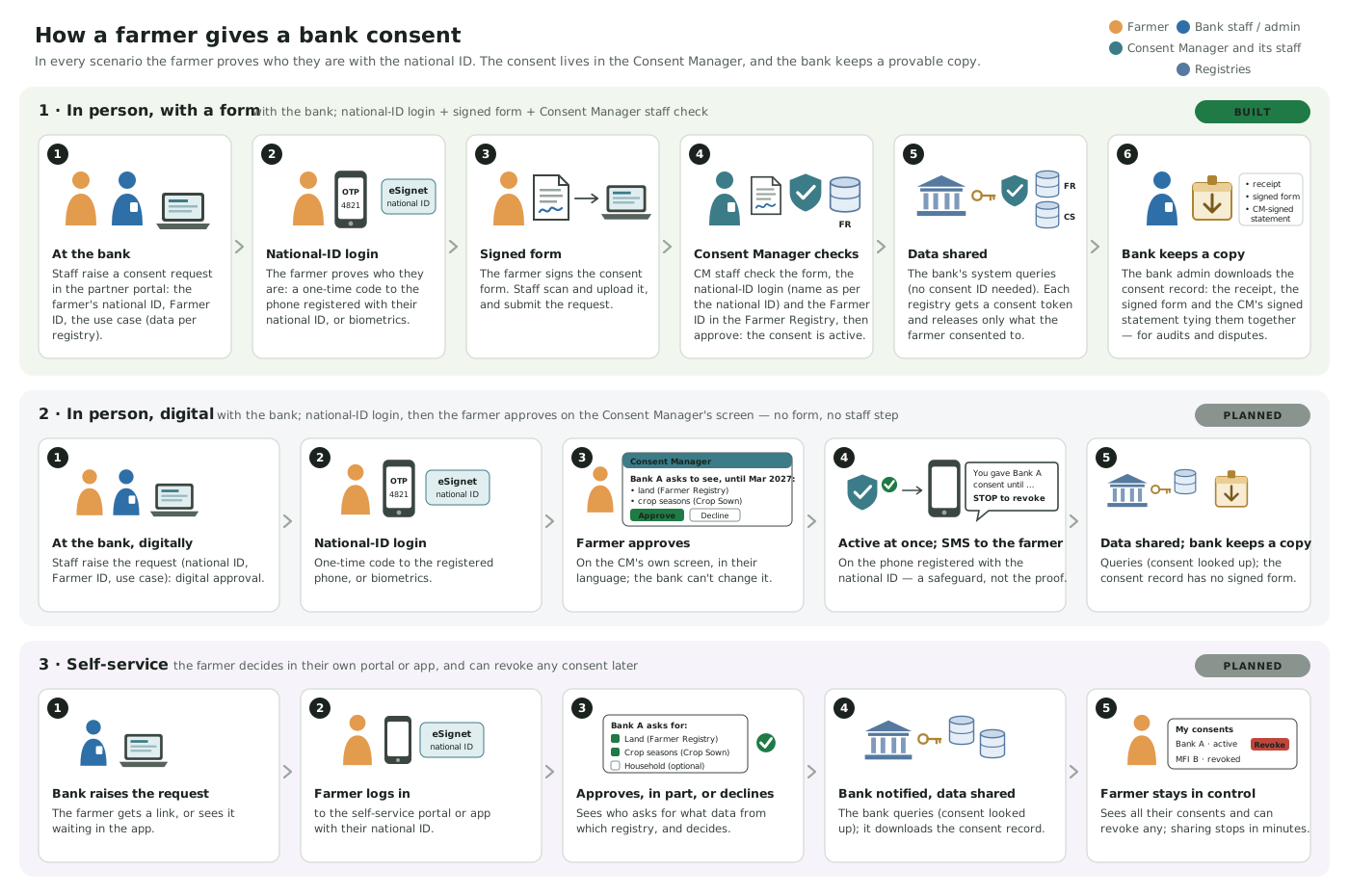
The three consent scenarios
## Principle
**The subject's confirmation happens at the CM, or through a channel the CM verifies, never on the partner's word.** The CM records how the subject confirmed (the **assurance**) on the consent.
## Scenarios
The subject proves who they are with their **national ID** (e.g. through eSignet): never by a phone number, a signature or the partner's word alone.
| | Where the subject is | Agreement | Staff check | Active | Status |
| ------------------------------ | ---------------------------------------- | -------------------------------------------------------- | -------------------------------------------------------- | ------------------- | ------------- |
| **1 · In person, with a form** | with the partner (office or field agent) | a signed form, uploaded | yes: CM staff verify the form (and, e.g., the Farmer ID) | after staff approve | **Built** |
| **2 · In person, digital** | with the partner | the subject approves on the CM's screen after logging in | none | at once | Not built yet |
| **3 · Self-service** | anywhere, on their own device | the subject approves in their own portal or app | none | at once | Not built yet |
### 1. In person, with a form (subject at the partner's office, or the partner's user in the field)
1. A partner user creates the consent request in the partner portal: the use case (or purpose and registries), the subject's ID, the validity.
2. The subject logs in with their national ID on the spot (OTP to the phone registered with the ID, or biometrics); the CM records the authentication. Required when the install turns it on, always at an Exchange ([below](#national-id-authentication-in-the-partner-portal)).
3. The subject signs a consent form; the partner user uploads it as evidence and submits the request.
4. CM staff check the form against the subject and the request (console **Consent Approvals**) and approve it. Only then is the consent active.
### 2. In person, digital (not built yet)
An extension of scenario 1 without the paper form and the back-office check:
1. A partner user creates the consent request in the partner portal, choosing **digital approval**.
2. The subject logs in with their national ID (eSignet: OTP to the phone registered with the ID, or biometrics), as in scenario 1.
3. Right after the login, in the same window, the **CM** (not the partner) shows the subject the request: who asks, which data from which registry, for what purpose and until when, in the subject's language. The subject **approves** (all, or part where optional) or **declines**. The partner cannot change what is shown.
4. On approval the consent is **active at once**; no staff step.
5. The CM texts the **phone registered with the national ID** (never a number from the partner): "You gave Bank A consent to see … until …; reply STOP or use this link to revoke." SMS here is a safeguard after the fact, not the proof.
The consent's assurance would record *national-ID authenticated, approved digitally, no form, no staff check*, and a policy could require scenario 1 for sensitive purposes (a minimum assurance per policy).
{% hint style="info" %}
**Why not "reply YES to an SMS".** A reply from a phone proves only that someone holds that SIM: not who they are (SIM swap, a shared phone), and not that they read what they agreed to. It can at most be a weaker option that a policy may refuse. When the partner reaches the subject remotely, a link that the subject opens on their own phone and logs into is scenario 3.
{% endhint %}
### 3. Self-service (not built yet)
The subject logs in to a self-service portal or app (national ID login), sees the pending request (who asks, for what, which data from which registry), and approves (all or part) or declines. The same place lists the subject's consents and lets them revoke any.
## What is built
* **Scenario 1**, end to end: the partner portal and partner realm, requests by partner users, signed-form upload (object storage), optional national-ID login, staff verification in the CM console, consents with their assurance and receipt, the partner's consent record.
* **Using the consent:** a partner sends no consent and the CM finds it by lookup; at an Exchange the Composite gets a consent token per registry ([Verification & enforcement](/platform/platform-services/consent-management/design/verification-and-enforcement.md)).
* **Partner-signed consents**, only from partners whose policy allows them (`allow_partner_consents`, off by default): the CM checks the partner's signature, not that the subject took part.
* **The origination API and the subject's own consents** (`/my/*`), on the beneficiary API (off by default).
What is not built yet: [Consent Management](/platform/platform-services/consent-management.md#not-built-yet).
## National ID authentication in the partner portal
When it is on, every assisted request needs **three** things before the consent is active: the subject's national-ID login, the signed form, and a CM staff member's verification. Settings: [Deployment](/platform/platform-services/consent-management/deployment.md#national-id-authentication-of-the-subject-esignet).
1. The partner user opens the request and chooses **Authenticate with national ID**. The CM starts a login at eSignet: authorization code with PKCE, a single-use `state` and a `nonce`, `acr_values` (e.g. a one-time code), and the `individual_id` claim (the national ID; eSignet's `sub` is pairwise, so it cannot be compared). The request's subject ID type must be one of the configured national-ID types.
2. eSignet opens in a popup. The person logs in there (the OTP goes to the phone registered with their ID), on the partner user's device or their own.
3. eSignet redirects to the CM's callback on the portal host. The CM claims the `state` once (an atomic update, so a replayed or concurrent callback finds nothing), exchanges the code with `private_key_jwt`, and checks the ID token's signature (eSignet's JWKS), `iss`, `aud`, `exp` and `nonce`. It reads the userinfo straight from eSignet over HTTPS with the access token, which is what makes it authentic (OIDC Core 5.3.2): eSignet passes on the identity system's signed answer, with that system's key (not published by eSignet) and its own `iss`, so the signature is checked only when the key is one eSignet publishes; its `aud` must be this client and its `sub` the ID token's (the same pairwise ID). The `individual_id` must equal the request's subject ID.
4. The portal follows the result (polling) and shows it; **Submit** is possible only after a successful login and the signed-form upload.
5. Staff see the authentication on the verification page. On approval the consent's **assurance** records it: `subject_authenticated: true` and `subject_authentication` (provider, method, ACR, time).
Stored: the method, ACR, time, the ID token's hash and the configured claims (default the name); not the tokens. Login state is a row in the CM's database (5 minutes), so no cache is needed.
## Identifiers and demographics
**The consent is about the person, keyed by the national ID.** The subject proves they own it by the national-ID login (an exact match of `individual_id`), and that is the subject ID of the request and the consent.
**Other identifiers of the subject** (e.g. the **Farmer ID** in Agri Stack) are carried with the request and everything made from it: the partner portal's request and consent pages, the staff verification page, the consent, and the partner's consent record. A deployment lists the ones every request must carry (`partnerPortal.requiredSubjectIdentifiers`, e.g. `[FARMER_ID]`); a request without them is refused. The CM does not look them up: **the approver checks them in the registry** (the registry is the source of truth for the link between the national ID and, e.g., the Farmer ID) and ticks that they did; approval is refused otherwise, and the consent's assurance records it (who, when). The consent receipt is unchanged.
**Identifiers decide; demographics never do.** Names and dates of birth differ between the national ID, the registry and a paper form (spelling, transliteration, script, outdated records), so they are never compared automatically and never block anything. The demographics shown are those the identity provider returned at the login (e.g. the name **as per the national ID**), always labelled with their source, **not** the registry's record; they help the approver judge the signed form. The registry stays the source of truth for the subject's data.
## The partner's copy of a consent
For disputes and audits a partner keeps its own copy. On a consent in the partner portal, **Download consent record** gives one ZIP:
| File | What it is |
| ---------------------------- | ----------------------------------------------------------------------------------------------------------------------------------------------------------------------------------------------------------------------------------------------------------------------------------------- |
| `consent-receipt.json` | The consent receipt as the CM issued it. **Unchanged**: the record only adds files around it |
| `evidence/…` | The documents uploaded on the request (the subject's signed form) |
| `consent-record.jws` | A statement signed by the CM (same key and public JWKS as the receipts) that ties them together: the consent, the SHA-256 of the receipt and of each document, whether and how the subject authenticated with national ID (provider, method, time), and when the CM verified the evidence |
| `consent-record.json` | The same statement, readable |
| `summary.html` | A printable one-page summary |
| `cm-jwks.json`, `README.txt` | The CM's public key at download time, and how to check the record |
With it a partner can show, without the CM, that this exact signed form backed this consent: check the statement's signature against the CM's published JWKS, then the files' SHA-256 values. The staff member who verified is not named (only the time); that stays in the CM's audit trail. The statement is signed when the record is downloaded; the facts in it are those recorded at approval. If a stored document no longer matches the SHA-256 recorded at upload, the download is refused.
## Partner portal
Most partners will not build their own consent screens, so the **partner portal** is the main way in. It is a front end over the CM's partner portal API ([API Reference](/platform/platform-services/consent-management/api.md#partner-portal-endpoints)).
* **Consent requests:** create one (scenario 1), upload the signed form, start the subject's national-ID login, submit, follow its status, cancel.
* **Consents:** list them with their scopes, validity, assurance and status (including revocations), and download the receipt and the [consent record](#the-partners-copy-of-a-consent).
* **What we can ask for** (read-only): the partner's policies, read from Partner Management.
* **Not in the portal:** policies and keys (requested and approved in Partner Management by staff), the verification of uploaded forms (CM staff, in the console), and partner users (created by staff; see [Deployment](/platform/platform-services/consent-management/deployment.md#partner-portal-and-consent-evidence-optional)). A partner user has the role `PARTNER_OPERATOR` or `PARTNER_ADMIN`; the CM treats them alike.
**At an Exchange** (a CM in the [exchange role](/platform/platform-services/consent-management/design/exchange-consent-tokens.md)), partners are granted use cases, not registry scopes, so the portal works **by use case**. The partner has one policy per use case in Partner Management. "What we can ask for" lists one entry per such policy: the use case with its purpose and data per registry (read from the Composite) and the policy's purposes, subject ID types and longest validity. A new request must name one of them (a request naming registries and scopes is refused; a use case without a policy is refused `use_case_not_granted`): its purpose and grants are the use case's, and that use case's policy limits apply. Staff approval narrows the consent to the use case's scopes at that time, and the consent records the use case: the Composite can use it for that use case only. The partner need not keep the consent ID: a request to the Composite may carry no consent, and the Exchange CM finds it ([consent by lookup](/platform/platform-services/consent-management/design/verification-and-enforcement.md#use-case-mode)). If the Composite cannot be reached, no such request can be raised or approved (fail closed).
### Purposes and subject ID types
The portal offers purposes and subject ID types from the country's **Master Data** code lists (by default `CONSENT_PURPOSE` and `SUBJECT_ID_TYPE`), the lists Partner Management uses in policies, so a request and its policy use the same codes. The CM reads them with its own service account and caches them; the portal gets them from `GET /consent/v1/partner-portal/request-settings`. Settings: [Deployment](/platform/platform-services/consent-management/deployment.md#master-data-code-lists).
* **List loaded:** the form offers a dropdown, and a request naming a value outside the list is refused (`400`). At an Exchange only the subject ID type is checked; the purpose is the use case's.
* **No list** (not in the country's Master Data, Master Data unreachable, or not configured): free text, and requests are accepted. Master Data never blocks a request.
The partner's policy still limits both (an empty allowed list in the policy means any value).
**Ownership:** requests, authentication records, uploaded files (in the CM's object-store bucket), verification and the consent belong to the CM. Partner Management needs no partner-facing UI.
---
# Agent Instructions
This documentation is published with GitBook. GitBook is the documentation platform designed so that both humans and AI agents can read, navigate, and reason over technical content effectively. Learn more at gitbook.com.
## Querying This Documentation
If you need additional information that is not directly available in this page, you can query the documentation by asking a question.
Perform an HTTP GET request on the following URL with the `ask` and `goal` query parameters:
```
GET https://docs.openg2p.org/platform/platform-services/consent-management/design/consent-collection.md?ask=&goal=
```
`ask` is the immediate question: it should be specific, self-contained, and written in natural language.
`goal` is what the user is ultimately trying to achieve, the reason they need the answer. Sharing it helps GitBook give you a better, more relevant answer. A goal is most helpful when it describes the outcome the user wants rather than restating the question. For example, with `ask=how do I create an API token`, a goal like `automate deployments from our CI pipeline` lets GitBook tailor the answer to that use case.
The response will contain a direct answer to the question and relevant excerpts and sources from the documentation.
Use this mechanism when the answer is not explicitly present in the current page, you need clarification or additional context, or you want to retrieve related documentation sections.